Your car is already talking. OBDScan translates it.
Plug an ELM327 adapter into the OBD-II port and see what the vehicle's computer is already measuring: revs, temperatures, pressures, fuel, fault codes. All on your phone, with no account to create and not a single byte leaving the device.
Coming soon toGoogle PlayComing soon toApp Store
Requires an ELM327 adapter, which we neither sell nor make.
No account
No cloud
Works offline
Demo mode without an adapter
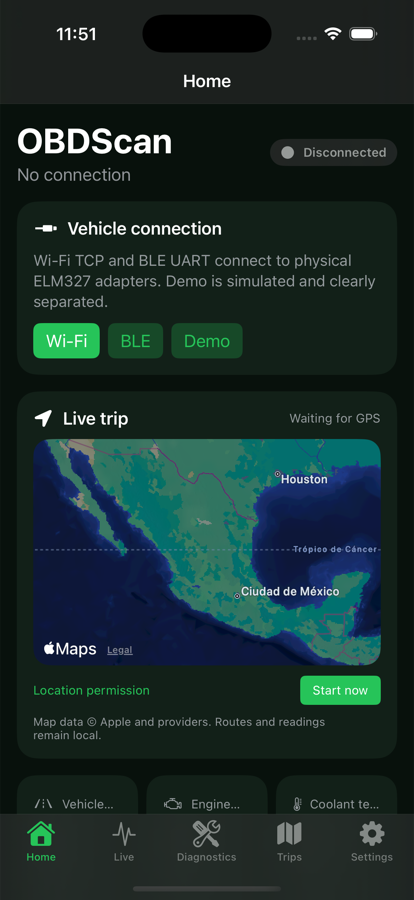
Home on iPhone. The same design on Android and iPad.
110supported signals
82standard Mode 01 PIDs
3,346vehicle profiles
95makes
8gauge styles
6visual themes
What it does
A full scanner, not a screen with three numbers
Every feature exists because it answers something concrete when you open the hood or wonder why a warning light came on. What the app cannot know, it says on screen instead of making it up.
Live sensors
Up to 110 signals derived from 82 standard Mode 01 PIDs: RPM, speed, engine load, coolant and intake temperature, manifold pressure, timing advance, O₂ and lambda sensors, fuel rate, torque. Only the PIDs your vehicle declares are polled, so the list never lies.
Eight gauge styles
Digital, bar, tachometer, level, chart, sparkline, segments and status. Any reading converts from one style to another while keeping its place, and every gauge takes a minimum and maximum scale, automatic expansion and up to five colour bands with editable start and end.
Fault codes, with nuance
Reads confirmed, pending and permanent codes separately, each with the ECU that reported it. Clearing requires a stationary vehicle and a fresh check of revs and speed, leaves a local record and is never retried on its own.
Clearing a code turns off the light, it does not fix the cause
Mapped trips
The route is drawn on the map with acceleration and braking events, and every point along it keeps the full picture of what the engine was doing at that instant. It starts on its own once you hold 20 km/h, or whenever you say so from a standstill.
History and playback
Replay a trip at the real pace it was recorded, at ×1, ×3, ×5 or ×10, with the map, the table and the charts in sync. The last 100 sessions are kept, and an interrupted session is recovered.
Exports that are actually useful
CSV and JSON with the original values in SI/OBD units, without conversions that would spoil the analysis. Trips use the .obs format, which Android and iOS both open: change phone and your history comes with you.
Vehicle catalogue 1996–2026
3,346 profiles from 95 makes and 836 families, to narrow the search by make, model, year and generation. It is a preliminary filter: the moment you connect, the vehicle's ECU is the final authority on what exists and what does not.
Six themes, and the map changes too
OBDScan, Vice, LA, NY, CyberPunk and Serius. Not just buttons in another colour: the whole interface changes, along with the pictograms, the charts and the treatment of the map. Every theme passes contrast tests before it ships.
Three ways to connect
Wi-Fi TCP, BLE UART and classic Bluetooth SPP on Android; Wi-Fi and BLE on iPhone. And if you do not have an adapter yet, Demo mode generates simulated data for all 110 signals, always labelled as simulated.
How it works
Three steps, and none of them is signing up
The OBD-II port is mandatory on practically every petrol car sold since 1996 in North America and since 2001 in Europe. It is usually under the steering wheel, around knee height.
Get an ELM327
Any adapter that speaks the ELM327 text protocol over Wi-Fi, BLE or classic Bluetooth. OBDScan includes searches on well-known stores to point you in the right direction, with no affiliation and no commission: we do not sell hardware and we do not endorse sellers.
Connect and pair
Plug the adapter in with the ignition on. Over Wi-Fi, the phone joins the network the adapter itself creates and you enter its IP and port; over Bluetooth, you pick it from the list. The app remembers the values for next time.
Drive, or just watch
OBDScan discovers which PIDs your vehicle advertises and shows only those. Build your home screen and your dashboard from what matters to you, let the trip record itself and look at it later, unhurried.
Safety first. Do not operate the app while driving. Set up your dashboard before you set off, and stop the vehicle somewhere safe to read or clear codes.
Compatibility
What each platform has
Both apps are native and share design, file format and catalogue. Where the operating system imposes a limit, the table says so.
Feature
Android
iOS
Wi-Fi TCP
Yes
Yes
Bluetooth BLE UART
Yes
Yes
Classic Bluetooth SPP
Yes
No: iOS does not open generic RFCOMM, only MFi accessories
Demo mode
Yes
Yes
Live sensors and eight styles
110 signals
SAE core, expanding
Fault codes and clearing
Yes
Yes
Full-screen dashboard
Yes
Yes
Trips, map and playback
Yes
Yes
Standalone OBD sessions and Replay
Yes
Pending
Live Activity and Dynamic Island
—
Yes
Persistent recording notification
Yes
Live Activity
Foldables and large screens
Yes
iPad
`.obs` trip exchange
Yes
Yes
Languages
Multilingual
Multilingual
Requires Android 10 or later (version 1.11.0) and iOS 17 or later (version 1.11.0). Universal for iPhone and iPad; Android adapts to foldables and small screens.
Privacy
Your readings never leave your phone
Not a marketing promise: there simply is no server to send them to. OBDScan has no accounts and no backend of its own.
No sign-up, no account. We do not ask for an email address, a phone number or a name.
No cloud. Routes, readings and settings live in your device's storage.
Your readings feed no profile. Neither the ECU signals nor your routes are used to profile or segment you.
Your readings and trips are not sold. They never leave the device, so there is nothing to sell.
Automatic backup is disabled on Android: nothing is uploaded to a backup account on its own.
Location is only used during a trip you start, and is released when it ends.
You decide what to share. Exporting always goes through the system picker and through your hand.
The one exception, stated in full
Map tiles are requested by the phone from its provider — OpenStreetMap on Android, Apple Maps on iOS — so the map can be drawn. That provider sees a request for tiles, like any map app; it does not receive your readings or your history. And if you export a file and send it to another service, that file is then governed by the rules of whoever receives it.
These buttons retheme this site using the same palettes that ship in the app. The app's theme is chosen in Settings and applies instantly across the whole interface, including the route trace and the treatment of the map.
Every theme is verified automatically: text and states at 4.5:1 over all five surfaces, outlines visible at 3:1, and the route trace kept distinct from the event markers. A theme that fails does not ship.
Questions
What people ask before installing
Will it work with my car?
If it is a petrol car sold in North America from 1996, in the European Union from 2001 (2004 for diesel), or in Mexico from 2006, it almost certainly has an OBD-II port and answers the standard modes. What varies enormously between vehicles is *how many* sensors the ECU exposes: two cars of the same year can give you 40 or 90 signals. OBDScan shows only the ones your vehicle advertises.
Do I need to buy anything besides the app?
An ELM327 adapter, which we neither sell nor make. Demo mode lets you try the entire interface with no adapter and no car. OBDScan includes searches on well-known stores as a pointer, with no affiliate links and no commission.
Why can't my iPhone see my Bluetooth adapter?
Because iOS does not let a general-purpose app open classic Bluetooth (RFCOMM/SPP); it only allows it for certified MFi accessories. That is an Apple restriction, not an OBDScan one. On iPhone, use a Wi-Fi or BLE adapter. On Android all three work.
Is it safe to clear a fault code?
Clearing turns off the warning light, but it fixes nothing: if the cause is still there, the code comes back. It also resets the readiness monitors, and a vehicle with incomplete monitors may fail an emissions test. OBDScan requires the vehicle to be stationary, checks revs and speed before sending the command, and asks for explicit confirmation.
Does it replace a professional scanner or a mechanic?
No, and it does not try to. OBDScan reads what is generic and standard in OBD-II. Transmission, ABS, airbag and body data, and much of what hybrids do, live in manufacturer-proprietary protocols that this app does not decode — precisely so it does not invent false numbers. It is for understanding what is going on and arriving at the workshop informed.
What happens with no internet?
Everything works except the map tiles. The route is still drawn on its own canvas with its markers and readings, and the app tells you why there is no map instead of going blank.
How do I move my data to another phone?
Export the trip in .obs format and open it on the other device. Android and iOS share the same file contract, so a trip changes platform with its route, its events and its readings intact.
Download OBDScan
Multilingual, for Android and iPhone. No account to create and nothing to agree to beyond not using it while you drive.
Coming soon toGoogle PlayComing soon toApp Store
Requires an ELM327 adapter, which we neither sell nor make.